You record thousands of sessions every week. How many do you actually watch?
For most teams, the answer is almost none. Session replay is one of the most powerful tools in a product team's arsenal — but the sheer volume of recordings makes it practically impossible to find the ones that matter. The user who rage-clicked your checkout button, the error that killed a conversion, the moment someone gave up on your onboarding flow — those signals are in your recordings. You just can't find them manually.
Today we're launching AI Session Insights, a new feature that changes how you use session replay entirely. Instead of you searching for interesting sessions, the AI finds them for you.
AI That Watches Every Session
AI Session Insights runs automatically in the background on every recorded session. Our AI models analyze mouse movements, clicks, scrolls, page transitions, errors, and timing patterns — then score and rank each session by how interesting it is.
The most noteworthy sessions surface to the top of your dashboard, each tagged with exactly why it was flagged. You know what to look for before you press play.
No filters to configure. No events to tag. No rules to write. Install Inspectlet, and the AI starts working on day one.
Real-Time Narration During Playback
This is the part that feels like magic.
When you open a session recording, Insights narrates what's happening in real time as you watch — explaining what the user did, why it matters, and what to look for next. It's like having a senior UX researcher sitting beside you, pointing things out.
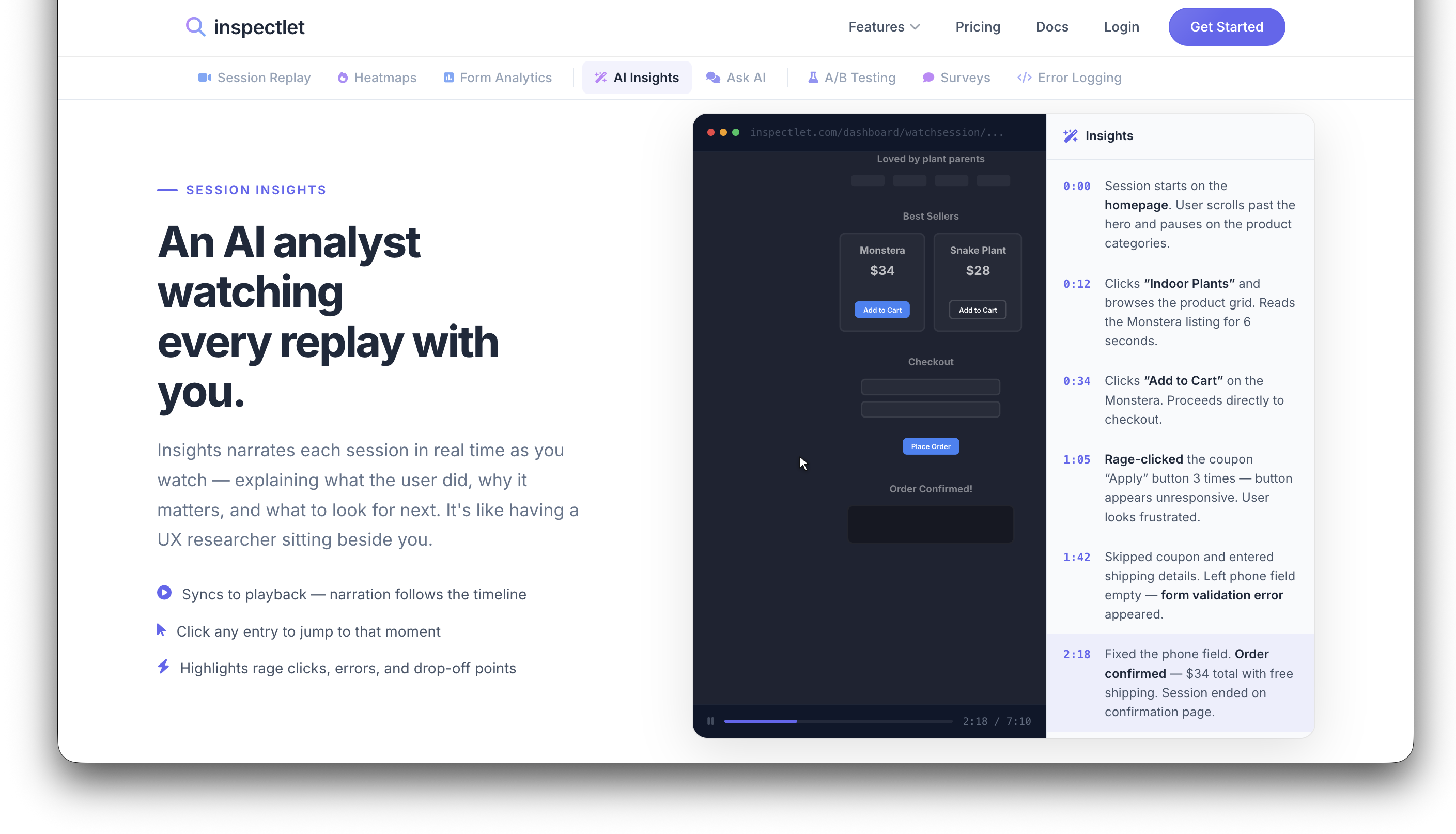
The narration syncs to the playback timeline. Click any entry to jump straight to that moment in the recording. Rage clicks, errors, and drop-off points are highlighted automatically so you never have to scrub through minutes of routine browsing to find the 10-second problem.
What the AI Detects
Every signal is analyzed automatically across every session. No configuration, no guesswork.
Rage clicks — Repeated, frustrated clicking on elements that don't respond. One of the strongest signals that something is broken or confusing in your UI.
Error sessions — JavaScript errors, failed API calls, and console warnings that directly impacted the user's experience.
Conversion drop-offs — Users who reached a key step in your funnel — checkout, signup, onboarding — and abandoned before completing it.
Form abandonment — Sessions where users started filling out a form but gave up. The AI identifies exactly which field caused the friction.
Unusual navigation — Visitors who took unexpected paths: back-and-forth loops, dead-end pages, or skipped critical steps in a flow.
Engagement anomalies — Unusually long sessions, rapid scrolling, or deep engagement that stands out from normal behavior patterns.
From Thousands of Sessions to the Ones That Count
Without AI Session Insights, using session replay looks like this: scroll through an endless list of recordings, filter by page URL and hope for the best, watch five-minute sessions to find a ten-second problem, miss the sessions that actually contained the answers, and eventually give up and check recordings once a month.
With AI Session Insights, you open your dashboard to a curated list of high-value sessions. Each one is tagged with a reason — "Rage click on CTA," "Checkout drop-off," "Form abandoned at email." You click, jump straight to the interesting moment, and discover issues you didn't even know to look for. Your daily review takes under five minutes.
It transforms session replay from a reactive tool you use occasionally into a proactive discovery engine your team checks every morning.
Getting Started
AI Session Insights is available now for all Inspectlet plans. There's nothing extra to install or configure — if you already have Inspectlet's tracking code on your site, recommended sessions will start appearing on your dashboard automatically.
For a deeper look at how it works, visit the AI Session Insights feature page.